
How to "manually" create a ticket?
1. Go to https://sqm.televic.com.














2. Enter the Business Unit that will be addressing the supplier (typically the Business Unit that "owns" the material).
3. Enter the material number:
4. Enter the vendor (= the supplier that will be addressed to rework/replace the material):
5. Enter the order number, this can be a Purchase Order (PO) or Production Order (ProdOrd).
Or enter "n/a" (not applicable) if not relevant (e.g. for "Request for Rework").
6. Enter the total quantity to which the ticket is applicable (typically PO or ProdOrd quantity):
7. Click on below:
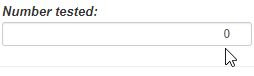
8. Enter the number of materials checked/tested (of the PO or ProdOrd):
9. Enter the number of materials that are non-conform (of the PO or ProdOrd):
10. Click on below:
11. Fill-in the Non Conformity Subject (a very brief & clear description of the non-conformity):
E.g. Dimension NOK, Defect LED, Packaging NOK, Wrong version,..
12. Enter the "Error code" (see Error codes (FR_PRD_24_E_ErrorCodes).pptx):
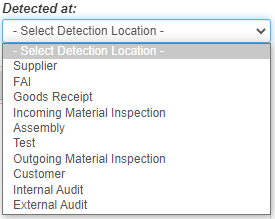
13. Enter where the non-conformity has been detected:
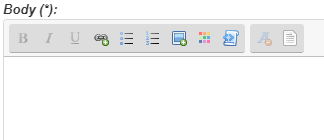
14. Add a brief description of the non-conformity (this can be edit in the ticket):
15. Click-on "Take over" to assign the ticket to yourself:
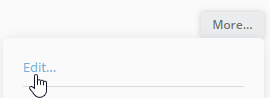
16. If required, update the ticket body via More > Edit:
16. If required, add pictures or other attachments to the ticket, see here.
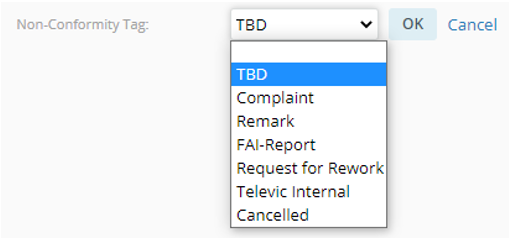
17. Set the Non-Conformity tag, see here:
18. When materials are returned, enter the quantity returned:
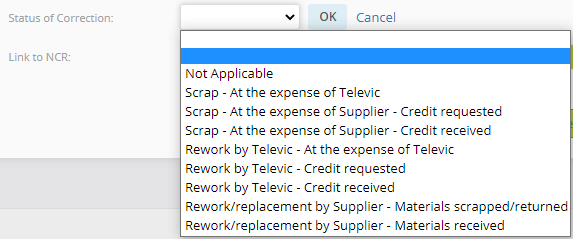
19. Set the field "Status of correction" depending on the status of the ticket (see here):
20. Communicate the ticket to the supplier, by pressing the button "Send to Supplier".
21. Review the supplier Quality contact(s) in the To:
(for update, see https://jitbit-sqmtool.televic.com/KB/View/20449-how-to-addupdate-a-contact-person-in-sap-for-quality-assurance)
22. If required, add internal stakeholders in Cc (e.g. the Supplier Quality Engineer, the Planner, the involved R&D Engineer,..).
23. Press the button "Send Email"
DataImage11.png
DataImage11.png
DataImage20.png
DataImage20.png
DataImage20.png
DataImage20.png
DataImage28.png
DataImage28.png
DataImage39.png
DataImage39.png
DataImage39.png
DataImage39.png
DataImage56.png
DataImage56.png
DataImage64.png
DataImage64.png
DataImage68.png
DataImage68.png
DataImage73.png
DataImage73.png
DataImage73.png
DataImage73.png
DataImage75.png
DataImage75.png
DataImage77.png
DataImage77.png
DataImage84.png
DataImage84.png
DataImage89.png
DataImage89.png
DataImage9.png
DataImage9.png
DataImage92.png
DataImage92.png
DataImage92.png
DataImage92.png
| Files | ||
|---|---|---|
|
DataImage11.png 2 KB |
||
|
DataImage20.png 1 KB |
||
|
DataImage20.png 1 KB |
||
|
DataImage28.png 1 KB |
||
|
DataImage39.png 1 KB |
||
|
DataImage39.png 1 KB |
||
|
DataImage56.png 2 KB |
||
|
DataImage64.png 17 KB |
||
|
DataImage68.png 2 KB |
||
|
DataImage73.png 4 KB |
||
|
DataImage73.png 9 KB |
||
|
DataImage75.png 2 KB |
||
|
DataImage77.png 3 KB |
||
|
DataImage84.png 3 KB |
||
|
DataImage89.png 2 KB |
||
|
DataImage9.png 4 KB |
||
|
DataImage92.png 31 KB |
||
|
DataImage92.png 3 KB |
 Get help for this page
 Jitbit HelpDesk