
How to load the default setting for ZQA33?
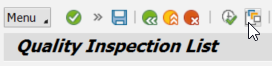
1. Select "Get Variant":
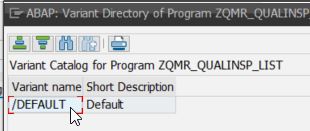
2. Double-click on "/DEFAULT":
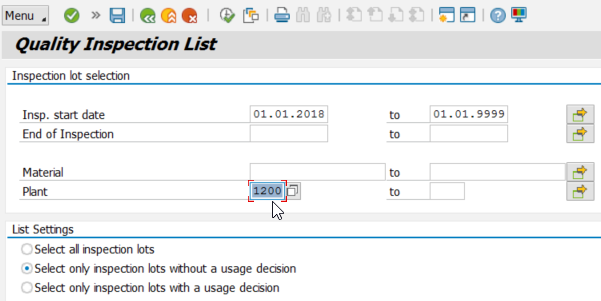
3. The default settings are loaded (start & end date, selection lots without usage decision). You only need to enter the plant number:
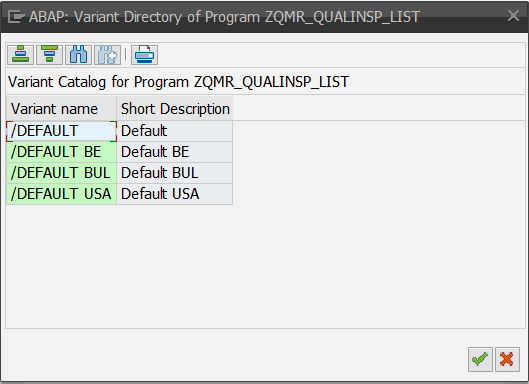
Note: More default "variants" & "layouts" have been added to see the inbound material inspection worklist of a site:
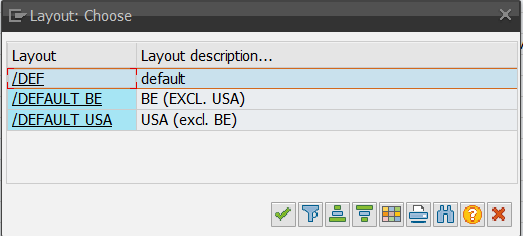
DEFAULT BE => Plants 1100 (THC), 1200 (TCS) and 1300 (TRA). Subsequently, select layout "DEFAULT BE" (see bottom screenshot).
DEFAULT BUL => Plant 1200 (Bulgaria)
DEFAULT USA => Plant 1300 (TRA). Subsequently, select layout "DEFAULT USA" (see bottom screenshot).

2. Double-click on "/DEFAULT":
3. The default settings are loaded (start & end date, selection lots without usage decision). You only need to enter the plant number:
Note: More default "variants" & "layouts" have been added to see the inbound material inspection worklist of a site:
DEFAULT BE => Plants 1100 (THC), 1200 (TCS) and 1300 (TRA). Subsequently, select layout "DEFAULT BE" (see bottom screenshot).
DEFAULT BUL => Plant 1200 (Bulgaria)
DEFAULT USA => Plant 1300 (TRA). Subsequently, select layout "DEFAULT USA" (see bottom screenshot).
Select layout:
DataImage31.png
DataImage31.png
DataImage31.png
DataImage31.png
DataImage45.png
DataImage45.png
DataImage67.png
DataImage67.png
DataImage80.png
DataImage80.png
DataImage81.png
DataImage81.png
DataImage81.png
DataImage81.png
| Files | ||
|---|---|---|
|
DataImage31.png 14 KB |
||
|
DataImage31.png 1 KB |
||
|
DataImage45.png 15 KB |
||
|
DataImage67.png 22 KB |
||
|
DataImage80.png 44 KB |
||
|
DataImage81.png 25 KB |
||
|
DataImage81.png 60 KB |
 Get help for this page
 Jitbit HelpDesk