
How to add pictures/files to a ticket?
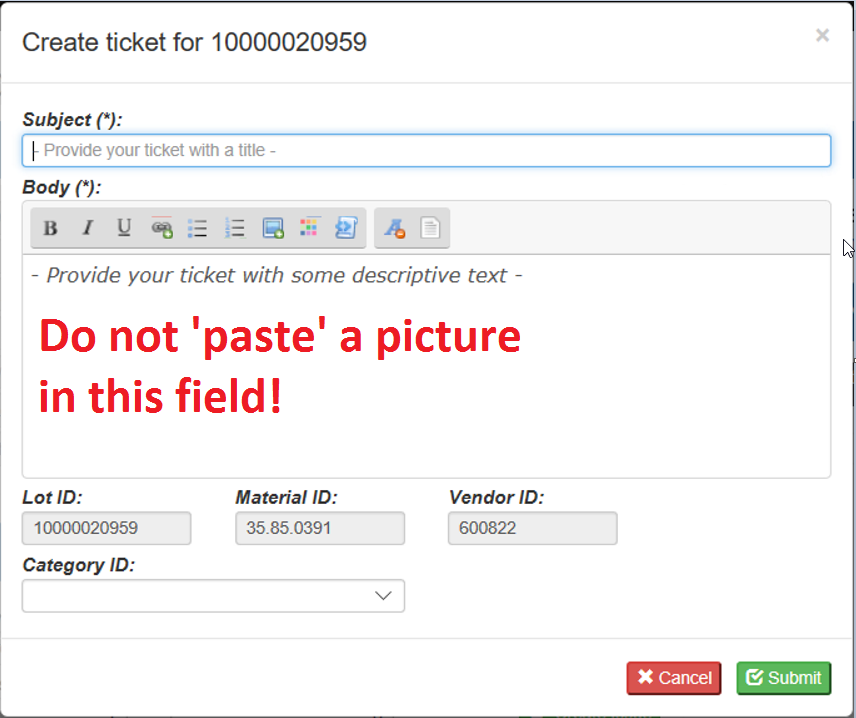
Do NOT insert pictures via sqm.televic.com (window below).
Reason: In this case the picture will be stored as "text" (will slow-down the "text" database) instead of an attachment (see below).
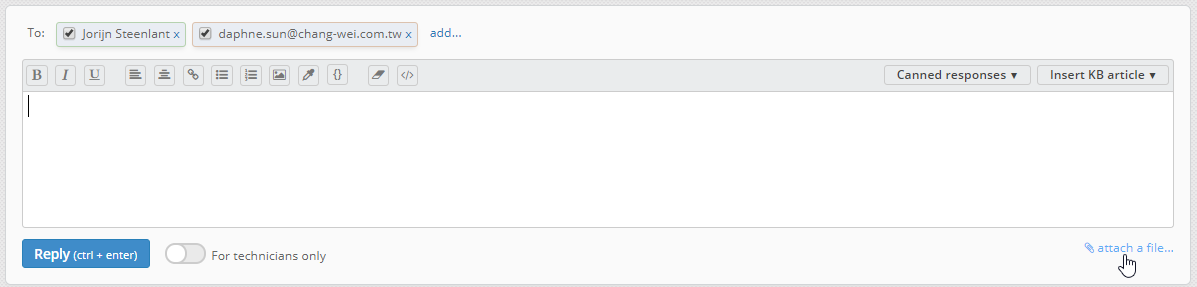
Attach pictures or files by replying in jitbit-sqmtool.televic.com and "attach a file" (multiple files can be attached):
Reason: In this case the picture will be stored as "text" (will slow-down the "text" database) instead of an attachment (see below).
Attach pictures or files by replying in jitbit-sqmtool.televic.com and "attach a file" (multiple files can be attached):
ATTENTION:
Pictures/files that are added "For technicians only" are also visible by the supplier (via the supplier portal)!
- Internal Emails can be logged "as text", "For technicians only" on a ticket.
- Internal files related to tickets can be archived on a fileserver/sharepoint location.
| Files | ||
|---|---|---|
|
DataImage49.png 118 KB |
||
|
DataImage84.png 27 KB |
 Get help for this page
 Jitbit HelpDesk