
General
1. Always use CHROME as browser.
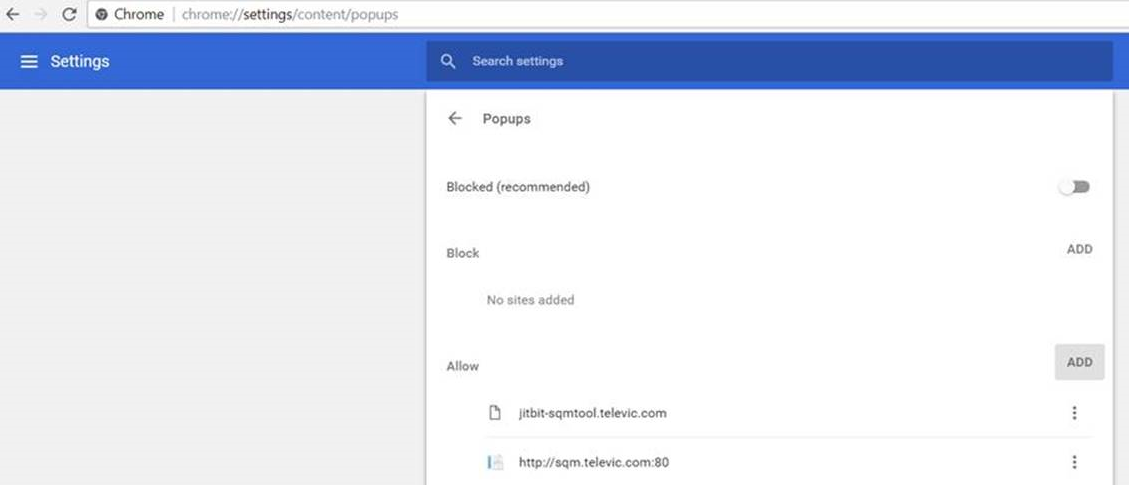
Allow pop-ups from jitbit-sqmtool.televic.com and sqm.televic.com:
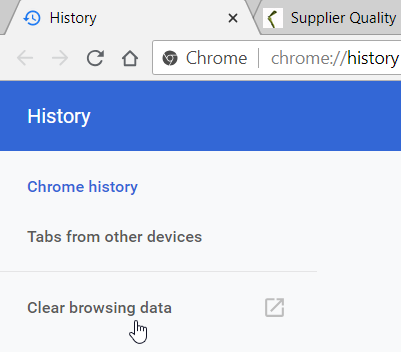
It is recommended to periodically clear your history (to avoid that - with a new version of the SQM-tool - still old DLL-files are used):
2. All communication should be in english.
3. When describing the non-conformity, try to proceed as follows:
a. State the specification (what was communicated to the supplier e.g. drawing, work instruction,..).
b. State what was objectively measured/noticed - not meeting the specification.
To increase understanding;
- try to use pictures (one picture per different kind of issue is sufficient);
- try to avoid a lot of text.
4. Update all ticket fields (e.g. attachments, non-conformity tag,..) before assigning the ticket to someone!
Reason: Some fields are copied into the Email the assigned person receives.
5. when uploading pictures (files) to the SQM-tool, please pay attention the size is limited (preferably < 1 MB/picture) & the no. of pictures is limited. If the size is too big or there’re too many pictures, then it takes a long time for the supplier to see the pictures appearing, resulting in the fact he thinks the pictures are missing.
Allow pop-ups from jitbit-sqmtool.televic.com and sqm.televic.com:
It is recommended to periodically clear your history (to avoid that - with a new version of the SQM-tool - still old DLL-files are used):
2. All communication should be in english.
3. When describing the non-conformity, try to proceed as follows:
a. State the specification (what was communicated to the supplier e.g. drawing, work instruction,..).
b. State what was objectively measured/noticed - not meeting the specification.
To increase understanding;
- try to use pictures (one picture per different kind of issue is sufficient);
- try to avoid a lot of text.
4. Update all ticket fields (e.g. attachments, non-conformity tag,..) before assigning the ticket to someone!
Reason: Some fields are copied into the Email the assigned person receives.
5. when uploading pictures (files) to the SQM-tool, please pay attention the size is limited (preferably < 1 MB/picture) & the no. of pictures is limited. If the size is too big or there’re too many pictures, then it takes a long time for the supplier to see the pictures appearing, resulting in the fact he thinks the pictures are missing.
| Files | ||
|---|---|---|
|
DataImage12.png 86 KB |
||
|
DataImage59.png 23 KB |
 Get help for this page
 Jitbit HelpDesk