
How to add/update a contact person in SAP for Quality Assurance?
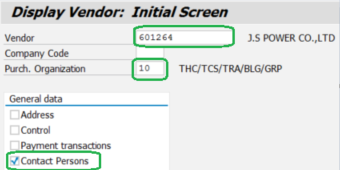
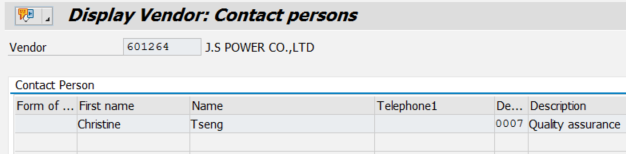
1. To have a read-only overview of contacts already added, use transaction XK03.
Select the vendor, enter "10" in Purch. Organization ("40" for Televic Rail GmbH) and enable "Contact Persons":
2. To add contacts, use transaction MAP1:
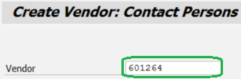
Select the vendor:
If you don't immediately have the vendor no., search for the vendor name:


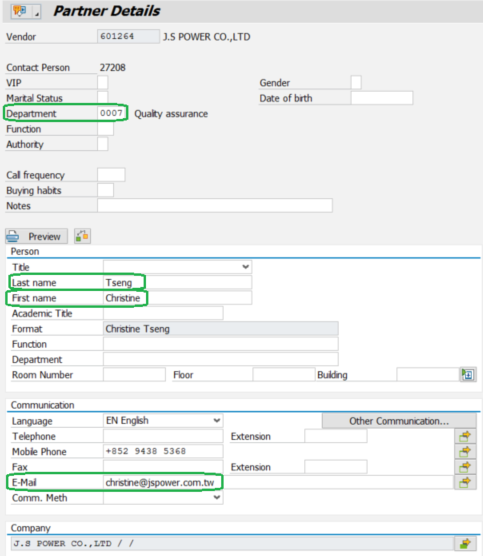
Add Department (= "0007"), Last name, First Name and E-mail (phone is optional) and save:
3. To change contacts, use transaction MAP2.
Notes:
a. If the contact already exists (e.g. already allocated to another Department), add a suffix to the Name of the contact to make his name unique; for example "_", see below:

b. Maximum 2 contacts can be added under Department "0007" (*). All will be put in the "To" of the initial Email sent to the supplier

(*) Because the width of the field containing the concatenated Email addresses is max. 40 characters long.
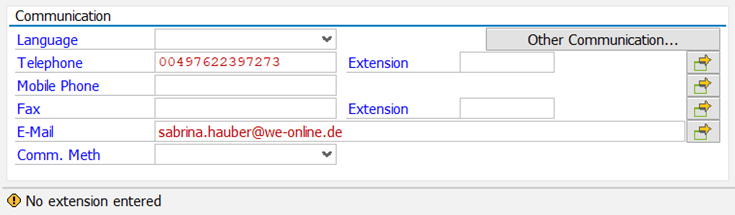
c. If you want to add the Telephone without Extension, then you need to press again on "Enter" to confirm the yellow warning message on the bottom:
Select the vendor, enter "10" in Purch. Organization ("40" for Televic Rail GmbH) and enable "Contact Persons":
2. To add contacts, use transaction MAP1:
Select the vendor:
If you don't immediately have the vendor no., search for the vendor name:
Add Department (= "0007"), Last name, First Name and E-mail (phone is optional) and save:
3. To change contacts, use transaction MAP2.
Notes:
a. If the contact already exists (e.g. already allocated to another Department), add a suffix to the Name of the contact to make his name unique; for example "_", see below:
b. Maximum 2 contacts can be added under Department "0007" (*). All will be put in the "To" of the initial Email sent to the supplier
(*) Because the width of the field containing the concatenated Email addresses is max. 40 characters long.
c. If you want to add the Telephone without Extension, then you need to press again on "Enter" to confirm the yellow warning message on the bottom:
d. To delete a contact, send an Email to data-support@televic.com (it is not possible to delete a contact person via MAP1 or MAP2) or go to https://data-support.televic.com to launch a ticket.
DataImage26.png
DataImage26.png
DataImage43.png
DataImage43.png
DataImage44.png
DataImage44.png
DataImage44.png
DataImage44.png
DataImage5.png
DataImage5.png
DataImage52.png
DataImage52.png
DataImage68.png
DataImage68.png
DataImage84.png
DataImage84.png
DataImage84.png
DataImage84.png
DataImage88.png
DataImage88.png
DataImage9.png
DataImage9.png
DataImage91.png
DataImage91.png
| Files | ||
|---|---|---|
|
DataImage26.png 11 KB |
||
|
DataImage43.png 43 KB |
||
|
DataImage44.png 4 KB |
||
|
DataImage44.png 83 KB |
||
|
DataImage5.png 23 KB |
||
|
DataImage52.png 10 KB |
||
|
DataImage68.png 25 KB |
||
|
DataImage84.png 41 KB |
||
|
DataImage84.png 12 KB |
||
|
DataImage88.png 3 KB |
||
|
DataImage9.png 30 KB |
||
|
DataImage91.png 33 KB |
 Get help for this page
 Jitbit HelpDesk